Пояснювальне відео з картою супутникових знімків — стиль Satellite briefing
Створіть пояснювальне відео на основі реальних супутникових знімків: прольоти, мітки, маршрути й джерела на екрані. Для географії, конфліктів, торгових маршрутів і новин.
Входить у Starter, усі 24 стилі плюс твій власний · попередній перегляд створено рушієм ClipOnIt
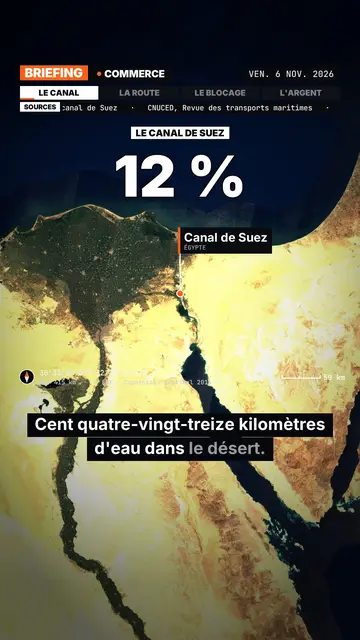
Як виглядає цей стиль
Satellite briefing tells your topic from above, on real satellite imagery. In each scene, the camera climbs then dives onto the next place, and drops a pin with the place's name and country. It can also point at several places at once or draw a route between two points, with labelled ends: a shipping lane, a pipeline, a front line.
Around the map sits an investigation-desk frame: series label, topic, date, chapter tabs and a scrolling “Sources” line that includes the imagery credit. Instruments fill out the screen (compass, coordinates, altitude, scale bar). On the dimmed map, an inset can show a library element, an image you import or data bars, and captions light up word by word.
Підходить для тем
Avoid: topics that do not happen anywhere in particular (psychology, tips, abstract ideas) and indoor scenes: the map then has nothing to show. The imagery is a cloud-free mosaic from a single year, so it cannot show a recent change on the ground.
- Geography and bordersShowing where a strait, an enclave or a disputed border sits beats describing it.
- Conflicts and world newsPins and routes place the facts, and the sources line reminds viewers where the information comes from.
- Trade and supply chainsA cargo ship crossing a canal, coffee crossing an ocean: the drawn route makes the journey obvious.
- MegaprojectsA dam, a new city or an airport makes more sense when you can see its footprint on the ground.
Ідеї відео в цьому стилі
- Why the Suez Canal matters so much
The camera follows a cargo ship from Asia to Europe, then draws the detour around Africa if the canal closes.
- The journey of a coffee bean
A pin on a plantation, another on a port, then the route all the way to your cup.
- What is at stake in a strait
Zoom on the passage, the bordering countries pinned, and data bars on the traffic going through.
- A city built in the desert
A flyover of the site, a scale bar on screen, and an inset with the project image you import.
Отримайте за 1 клік
- Відкрий посилання на цей стиль
Кнопка «Створити відео в цьому стилі» відкриває редактор із уже вибраним цим стилем. Без облікового запису реєстрація займе хвилину і не потребує картки.
- Напиши свою тему одним реченням
Достатньо однієї ідеї. Також можна вставити текст або, з Starter, розповісти в мікрофон: тоді відео буде створено на основі твого голосу.
- Перевір і рендери
ШІ пише сцени, підбирає елементи стилю й синхронізує їх зі словами, додає голос і субтитри. Ти виправляєш те, що не так, і за кілька хвилин отримуєш вертикальний MP4.
Що можна налаштувати
You can write the series label, topic, date and chapters on the bar, the list of sources, the stamp title, the kicker and the big figure. Places are given by name: AI puts them on the map, and you can add pins or draw a route. For an inset, pick a library element, import your image or enter data bars. Length, narration and three variants per scene stay adjustable; from Starter, your own voice and the AI Director.
Frequently asked questions
Безкоштовно чи ні, результат, використання: короткі відповіді.
Is the satellite imagery real?
Yes. The views come from a public, cloud-free satellite mosaic, credited on screen and in the sources line. They are archive images, not live views.
Does the AI make up sources?
No. The script is written never to invent a source: you add your own, and the “Sources” line shows what you provided.
How far can it zoom in?
Down to the scale of a city or a large site, such as a port or a dam. You cannot make out a single house or car.
Чи доступний цей стиль у безкоштовному тарифі?
Ні, він входить до Starter ($29/міс.): 15 відео на місяць без водяного знака, усі 24 стилі плюс твій власний. Безкоштовний план дає 3 відео на місяць із водяним знаком у 8 інших стилях: Pixel News, Press paper, Comedy cartoon, Class sketch, Night tale, Social screen, Retro synthwave і Flat vector.
Якщо тобі подобається цей стиль
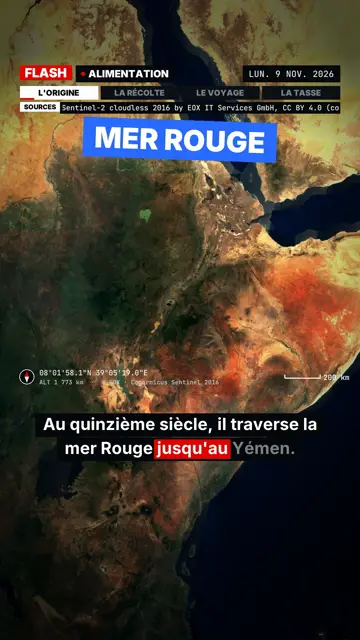
Breaking news explainer video
Flash brief style · News without a dull second: slammed captions, word-tracking box, satellite map and black panels.
- Free
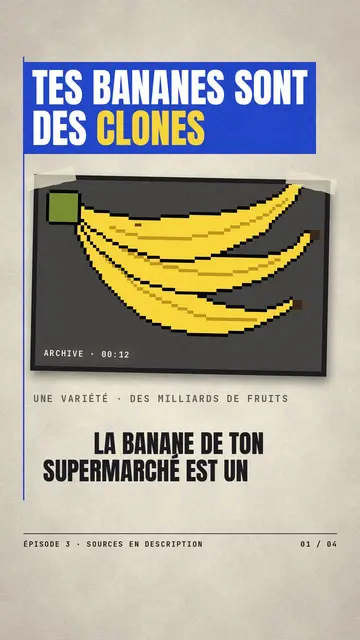
Новинне відео у стилі паперових вирізок
Стиль «Газетний папір» · Кремовий редакційний папір, сині й червоні банери, штамп.
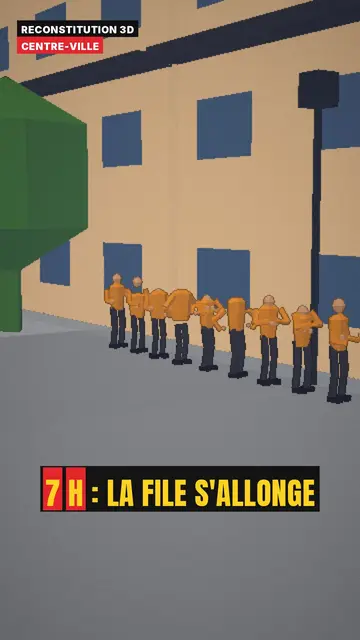
3D reconstruction animation
3D reconstruction style · Colourful daylight low-poly streets and interiors.
Твоя ідея в цьому стилі
Напиши речення або скажи його: стиль уже вибрано, коли ти потрапляєш до редактора.